
Employee records in one HRMS — not three Excel files
Core HR is the master record everything else hangs on. SBS HRM System gives each person a digital profile — personal and employment data, documents, department, designation, and reporting line — with visibility based on who needs to see what. When someone joins, transfers, or exits, the event is captured instead of disappearing into email.
Who uses core HR
HR administrators who own the employee file, managers who need an org view of their team, and finance users who must not see the whole personnel file. Role-aware visibility and permissions screens exist in the product; this is not an open shared drive.
What lives on the employee record
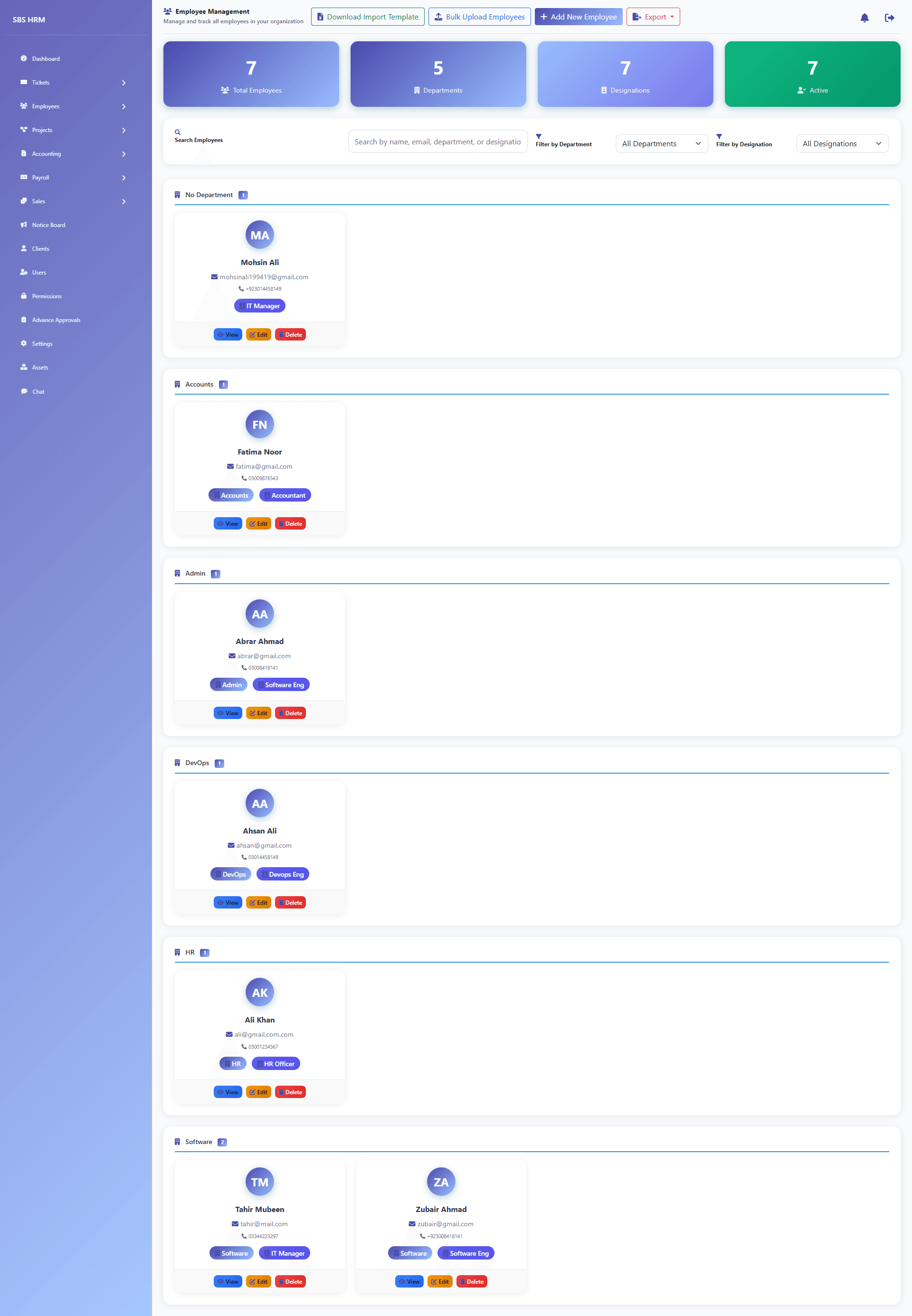
Gallery coverage includes the employee directory, departments, designations, document/import flows, and user accounts. Homepage copy covers org charts that stay current as you hire or reassign, plus a lifecycle audit trail for reviews and disputes. Bulk import exists for spreadsheet onboarding — it is an operations tool, not a reason to keep living in the spreadsheet.
Employee management software vs a shared folder
An employee management system should answer who works here, where they sit in the org, what documents apply, and who may see the file. Shared drives and chat exports do not provide role-aware visibility or a hire-to-exit trail. Core HR in SBS HRM is that directory — the foundation for attendance, leave, and payroll modules.
What this page is not
It is not an applicant tracking system. We do not ship a /features/recruitment URL until that product surface exists. Core HR starts when someone is an employee (or an import you choose to load).
Employee records for Pakistani organisations
Growing teams in Pakistan often keep the directory in one workbook, documents on a shared drive, and payroll identity in a third file. Employee management software is the core HR directory those modules should share — departments, designations, and bulk import included — so attendance and salary processing use the same person. This is not a recruitment or ATS page.
Capabilities visible in the product
- Employee directory and profiles
- Departments and reporting structure
- Designations and grades
- Document handling and bulk employee import
- User accounts mapped to people
- Permissions for least-privilege access
A hire-to-file workflow
1. Create or import the person
Add a profile or load a spreadsheet through the bulk import path used in the product.
2. Place them in the org
Assign department, designation, and manager so attendance, leave, and payroll know who they are.
3. Attach documents
Keep employment files with the record instead of a desktop folder named Final-v7.
4. Control access
Users and permissions determine who can see or change sensitive fields.
Questions
Can we import employees from Excel?
Yes. The product includes a bulk employee import path so you are not typing every record. After go-live, the HRMS directory is meant to be the source of truth.
Is there an applicant tracking / recruitment module?
Not as a dedicated marketing URL. We do not invent an ATS. Core HR starts when someone is an employee (or an import you choose to load).
How is access controlled?
User and permission screens exist for fine-grained access. Approved copy describes role-aware visibility on profiles.
Does this include payroll components?
The employee record is the identity payroll uses. Earnings, deductions, and runs live in the payroll module so we do not duplicate that commercial intent here.
Is this core HR for Pakistani companies or a recruitment tool?
It is the employee directory used by Pakistani organisations for records, departments, designations, documents, and bulk import. It is not an applicant tracking or recruitment module.
See this workflow in a private demo
Approved organisations receive tenant login details by email — the marketing site is not the HRM application.