
Attendance software that feeds payroll, not another spreadsheet
Fair pay starts with a trustworthy clock. SBS HRM System records organisation-wide attendance, personal history, raw device logs, and biometric / ZKT machine mappings so exceptions are cleared before the payroll register is built — not after salaries have gone out.
Who needs an attendance management system
Factories and warehouses running shifts, retail floors with multiple branches, and offices that still collect timesheets on WhatsApp. If disputes about late-ins and overtime consume your HR inbox, the attendance module is the commercial page — not a generic ‘HRIS’ article.
Biometric and ZKTeco devices
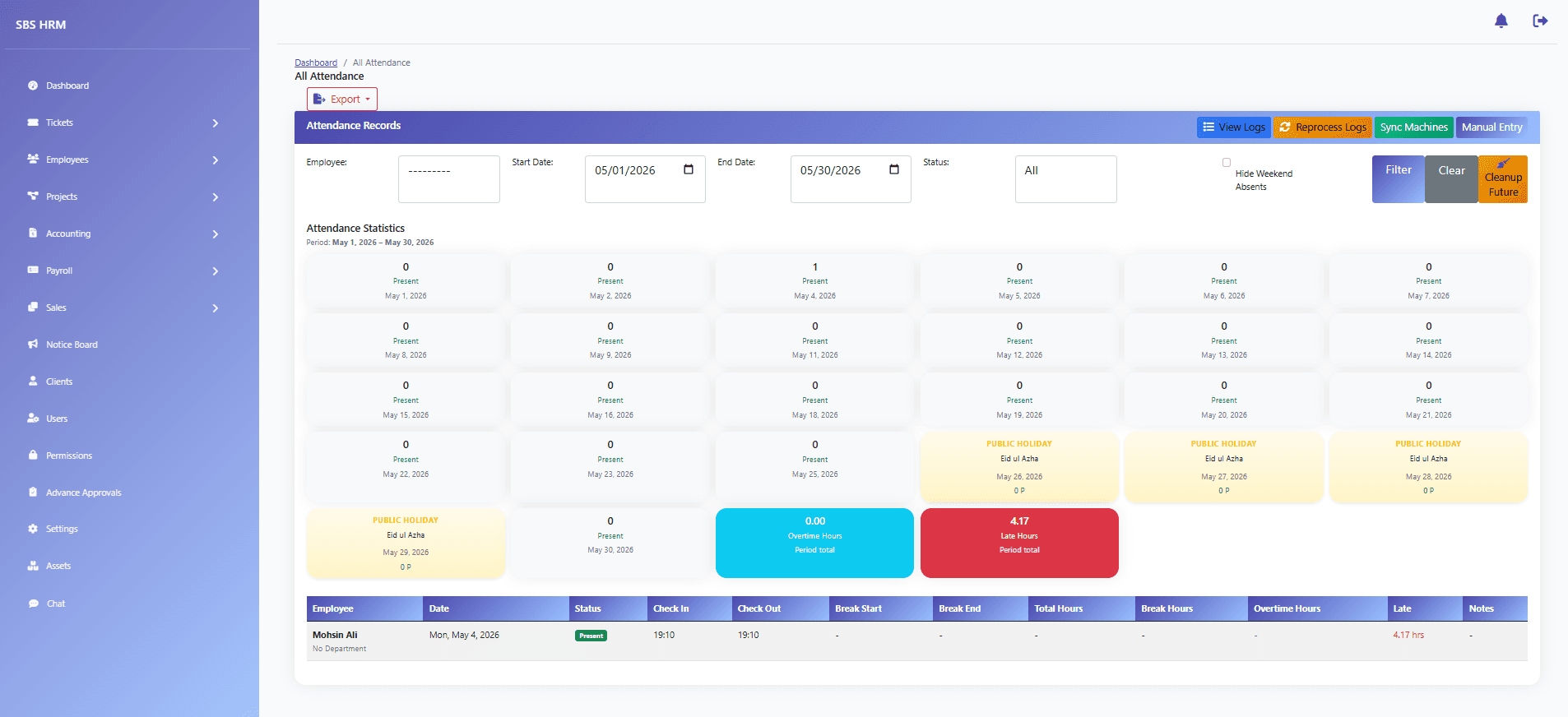
The product gallery includes an attendance-machines screen for biometric / ZKT and device management, plus attendance logs for raw clock data. Approved homepage copy states that SBS HRM connects with biometric devices and ZKT machines, then applies company grace rules, overtime policies, and exception workflows. We do not claim GPS geofencing or a public app-store time clock unless your tenant includes that channel.
Daily operations
Managers see who is present, late, or absent without chasing individual sheets. Employees can review personal attendance history. HR works exceptions in a queue instead of editing a shared workbook. When attendance is clean, payroll preparation is shorter — that is the link to the payroll module, not a second attendance URL.
How attendance data enters the system
Clock events come from mapped biometric or ZKTeco / ZKT devices into the attendance log view. The product does not ask you to re-type a register. Rules (grace, shift assignment, overtime) then interpret those punches for the day. GPS apps and geo-fences are not claimed as a default channel on this site.
Attendance problems this module is meant to close
Typical failures are late-in arguments, overtime that cannot be explained, a missed punch discovered after payday, and device logs that never leave a USB stick. An attendance management system keeps organisation-wide presence, personal history, and exception queues in one place so those disputes are cleared before salary processing starts.
Attendance reports and operational views
The company-wide attendance screen, personal history, and raw device logs are the operational reports managers and HR already use. Scheduled exports and attendance-pattern dashboards sit with HR analytics where that module is licensed. We do not invent extra statutory attendance filings.
Capabilities visible in the product
- Company-wide attendance view
- Personal attendance history
- Raw clock and device logs
- Biometric / ZKT machine management
- Location-aware grace rules (as configured)
- Exception handling before payroll
How attendance flows into pay
1. Devices punch
Employees clock on mapped biometric or ZKT hardware. Logs land in the attendance log view.
2. Rules apply
Grace, shift assignment, and overtime policies interpret those punches for the day.
3. Managers clear exceptions
Missing punches and disputes are resolved in the operational view, not in the payslip.
4. Payroll consumes the result
The payroll register uses settled time — which is why attendance and payroll are sibling modules, not clones.
Questions
Is SBS HRM a ZKT employee attendance system?
For many deployments, yes. SBS HRM maps ZKTeco / ZKT biometric devices, stores punch logs, applies grace and overtime rules, and feeds settled time into payroll. It is an attendance management program on one employee record — not a standalone clock-vendor app.
How is this different from a standalone attendance management program?
A standalone program may only store punches. SBS HRM keeps attendance on the same employee file as leave and payroll, with exception queues cleared before the monthly register is posted.
Do you integrate with ZKTeco / ZKT machines?
Yes. Product screens cover attendance machine management for biometric / ZKT devices, and homepage copy describes connecting those devices so clock data is captured automatically.
Can we still adjust a missed punch?
Exception workflows exist so managers and HR can clear issues before payroll. The point is a controlled adjustment, not an invisible edit in Excel.
Is mobile GPS attendance included?
This marketing site does not claim GPS or geo-fenced clock-in. If a tenant uses an additional channel, that is confirmed during discovery — it is not advertised as a default feature here.
How does this differ from shift management?
Attendance is what actually happened at the clock. Shift management is the roster you intended. Both modules exist; they are not the same URL.
How do overtime and grace periods work?
Approved copy describes company grace rules and overtime policies applied to captured punches. Exact thresholds are configured for your tenant during implementation — this page does not publish a single national overtime formula.
See this workflow in a private demo
Approved organisations receive tenant login details by email — the marketing site is not the HRM application.