
Payroll software built for Pakistani salary cycles
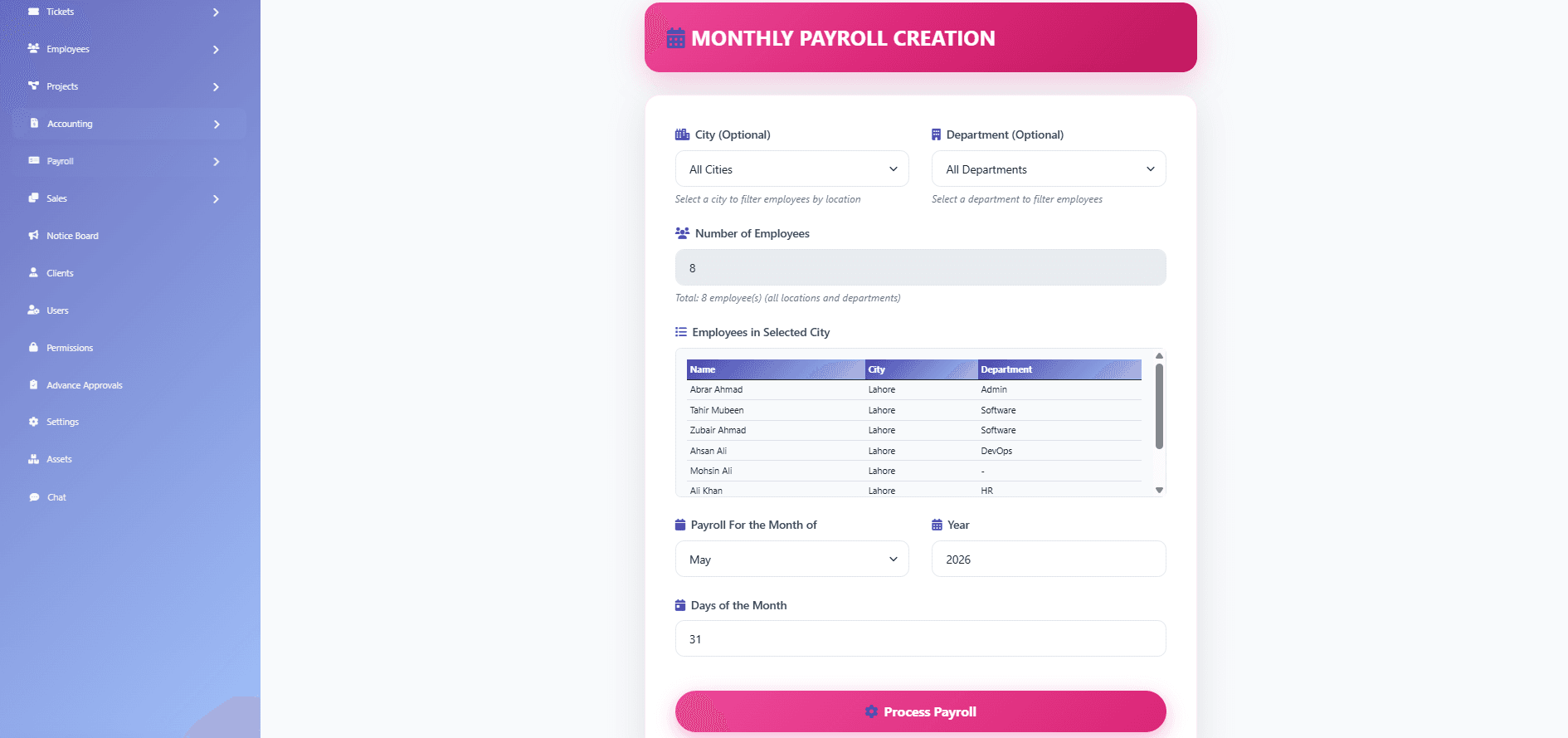
Month-end payroll fails when attendance, leave, loans, and tax live in separate files. SBS HRM System structures the payroll run so HR and finance share one register: earning and deduction components, statutory inputs already claimed in the product, a review step, then a locked period with payslips and a bank-sheet friendly export.
Who this payroll module is for
Teams that already calculate salaries in Pakistan — SMEs closing 20–50 slips in Excel, manufacturers mixing overtime with monthly pay, and multi-branch operators who need one register instead of a workbook per city. If your pain is reconciling attendance into net pay, this page is the commercial match. It is not a substitute for a tax advisor, and it does not claim to file FBR or EOBI returns on your behalf.
What a payroll run looks like
Open or create the monthly payroll period, pull the employee population that should be paid, apply earning and deduction components configured for your deployment, review the register, then post. Posted periods are treated as locked: later corrections are tracked rather than silently overwritten. That matches the payroll screens captured in the product gallery — monthly payroll, register, posted payroll, payslips, tax slabs, loans, and advances.
Pakistan-specific notes we can stand behind
Approved product copy already states that SBS HRM calculates against current FBR income tax slabs, records EOBI contributions, generates payslips, and produces bank-sheet friendly outputs as configured in your deployment. We do not claim PESSI/SESSI, automatic IRIS filing, or named IBFT formats unless your contracted tenant is configured for them. Statutory rules change — treat the engine as an operational system, not legal advice.
Why Pakistani businesses use payroll software
Pakistani salary cycles are usually monthly, with mid-month joiners, unpaid leave, loans, and overtime that must land on the same register. Spreadsheet payroll software breaks when attendance, tax slabs, and EOBI sit in different files. A payroll management workspace keeps those inputs on one run so HR and finance review the same figures before anyone is paid.
Payslips and payroll records
After a period is posted, payslips are generated for distribution and remain available in history. The locked register is the payroll record for that month — later corrections are tracked rather than silently overwritten. That is what finance needs when a figure is questioned after payday.
How payroll uses attendance
Salary processing is only as clean as the time that feeds it. Attendance exceptions and approved leave should be settled before you open the monthly register. Payroll consumes that settled result; it does not replace the attendance module. Pair this page with the attendance workflow when clock disputes are still landing in Excel.
Payroll reporting and export
The monthly register is the review surface. Bank-sheet friendly outputs are produced as configured for your bank process. Role-based dashboards and scheduled report exports described on the analytics page can include payroll cost breakdowns — we do not invent extra statutory filing exports beyond what your tenant is configured to produce.
Capabilities visible in the product
- Monthly payroll create/open flow
- Payroll register listing for the period
- Income tax slab configuration
- Employee loans and salary advances as deductions
- Payslip generation and history
- Posted / locked payroll periods
- Structured earning and deduction components
How payroll processing works
1. Confirm the population
HR checks who is active, who joined or exited mid-month, and which components apply — using the same employee records as core HR.
2. Bring time and leave in
Attendance exceptions and approved leave should be settled before you post. Payroll is only as clean as the inputs from attendance and leave.
3. Review the register
Finance and HR inspect gross-to-net on the monthly register, including loans and advances, before anyone is paid.
4. Post, payslip, bank sheet
Lock the period, generate payslips for distribution, and export a bank-sheet friendly file as configured for your bank process.
Related reading
- Attendance that feeds payroll
- Leave balances and unpaid days
- Employee records and components
- Payroll cost and workforce reporting
- What is payroll management software?
- Payroll close checklist
- FBR tax slabs in payroll (educational)
- EOBI contributions in an HRMS
- Payroll screens in the gallery
- Compare published HRMS plans
- Book a payroll walkthrough
Questions
Does SBS HRM calculate Pakistani income tax?
The product includes income tax slab configuration and approved copy states calculations against current FBR income tax slabs. Your implementation team confirms the slabs in force for your tenant. This is not a filing service and is not legal advice.
Can we record EOBI contributions?
Yes. Approved payroll copy includes EOBI contributions as part of the structured payroll workflow. Exact contribution setup is agreed during implementation.
What happens after we post a payroll period?
Posted payroll is treated as locked. Adjustments are tracked rather than silently overwritten, which is what finance needs during reviews and disputes.
Do you generate payslips and a bank file?
Payslip generation and history exist in the product. Bank-sheet friendly outputs are produced as configured in your deployment. We do not advertise a specific bank’s IBFT layout unless that layout is part of your contracted configuration.
Does payroll software replace a tax advisor?
No. FBR tax slabs and EOBI contributions are operational configuration on the payroll run. Filing, exemptions, and statutory interpretation stay with your advisor and your entity.
See this workflow in a private demo
Approved organisations receive tenant login details by email — the marketing site is not the HRM application.